Cool tools from NirSoft as per:
https://www.nirsoft.net/utils/cports.html
CurrPorts v2.61 - Monitoring Opened TCP/IP network ports / connections Copyright (c) 2004 - 2020 Nir Sofer |
Related Utilities
- LiveTcpUdpWatch - View all TCP/UDP activity on your system.
- AppNetworkCounter - Monitor network usage / bandwidth of every application on Windows
- SmartSniff - Capture TCP/IP packets on your network adapter
- SocketSniff - Windows Sockets (WinSock) Sniffer
See Also
- NK2Edit - Edit, merge and fix the AutoComplete files (.NK2) of Microsoft Outlook.
Description
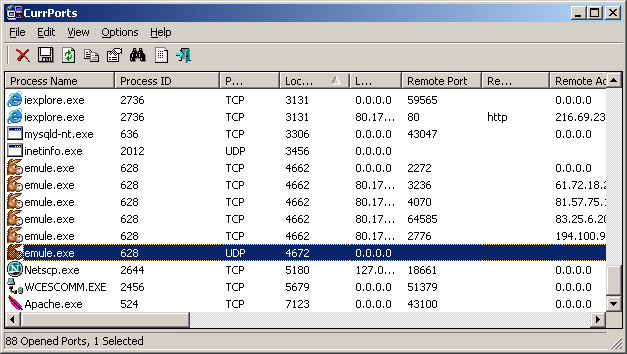
CurrPorts is network monitoring software that displays the list of all currently opened TCP/IP and UDP ports on your local computer. For each port in the list, information about the process that opened the port is also displayed, including the process name, full path of the process, version information of the process (product name, file description, and so on), the time that the process was created, and the user that created it.In addition, CurrPorts allows you to close unwanted TCP connections, kill the process that opened the ports, and save the TCP/UDP ports information to HTML file , XML file, or to tab-delimited text file.
CurrPorts also automatically mark with pink color suspicious TCP/UDP ports owned by unidentified applications (Applications without version information and icons)
Notice !
- When the 'Use DNS Cache For Host Names' option is turned on, there is a significant memory leak on every refresh. This memory leak is not caused directly by CurrPorts, but by the DNS cache programming interface of Windows. Currently, I cannot find a workaround for this problem, so if you run CurrPorts for many hours in automatic refresh mode, it's recommended to turn off the 'Use DNS Cache For Host Names' option.
- If you want to monitor UDP activity, you should try using the LiveTcpUdpWatch tool.
IT Consultant
www.inCOREporation.com


