Showing posts with label Managing Office 365. Show all posts

Thursday, March 23, 2017

Office 365 Deployment Wizard (Deployment Survey)

Office 365 Deployment Wizard

Deployment survey for Office 365 advisor
https://aka.ms/depforoffice365

Thanks to the great people at Microsoft

http://incoreporation.com       https://ca.incoreporation.com       http://wwebservices.ca 


Office 365 Share calendars with external users

Thanks to amazing people from Microsoft, here's great information on how to Share calendars with external users from Office 365

Option 1

According to https://support.office.com/en-us/article/Share-calendars-with-external-users-FB00DD4E-2D5F-4E8D-8FF4-94B2CF002BDD

Share calendars with external users

It’s often necessary to schedule meetings with people outside your organization. To simplify the process of finding mutually agreeable meeting times, Office 365 enables you to make calendars available to “external users,” those who need to see free/busy time but don’t have user accounts for your Office 365 environment.
Calendar sharing is a global setting, meaning that you, the Office 365 admin, can enable it for all users in the tenant. Once sharing is enabled, users can use Outlook Web App to share their calendars with anyone inside or outside the organization. People inside the organization can view the shared calendar side-by-side with their own. People outside the organization will be sent a URL that they can use to view the calendar. Users decide when to share, how much to share, and when to keep their calendars private.
NOTE:  If you want to share calendars with an organization that uses Exchange Server 2013 (an on-premises solution), the Exchange administrator will need to set up an authentication relationship with the cloud. This is known as “federation” and must meet minimum software requirements. See Sharing for more information.

Enable calendar sharing using the Office 365 admin center

  1. Sign in to Office 365 with your work or school account.
  2. Select the app launcher icon App launcher button and choose Admin.
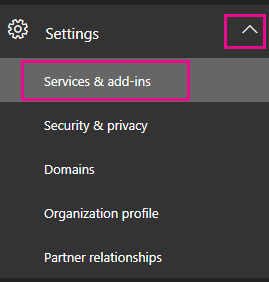
  3. Navigate to Settings > Services & add-ins.
    On the left navigation pane, click Settings, and then click Services & add-ins.
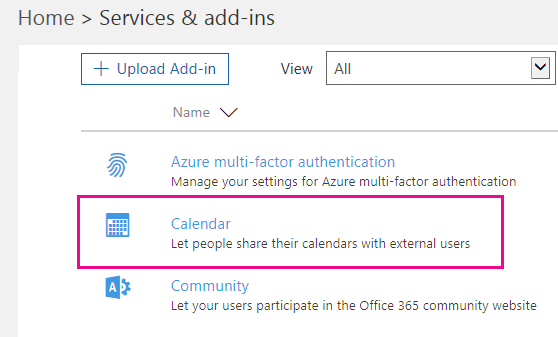
  4. On the Services & add-ins page, click Calendar.
    On the Services & add-ins page, click Calendar.
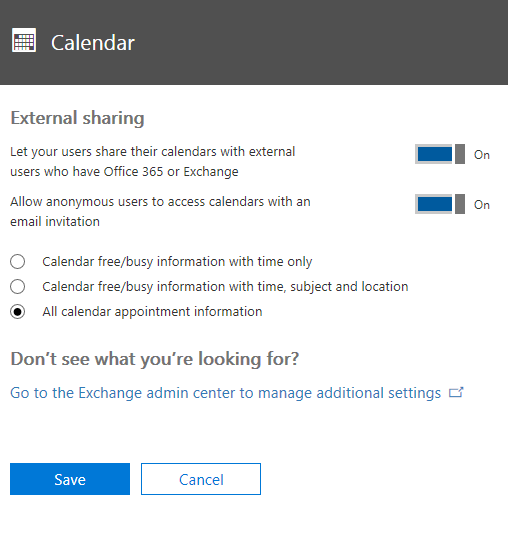
  5. On the Calendar page that opens, do one of the following:
    • For Let your users share their calendars with external users who have Office 365 of Exchange, move the slider to On to enable calendar sharing.
    • For Let your users share their calendars with external users who have Office 365 of Exchange, move the slider to Off to disable calendar sharing.
  6. If you want to allow anonymous users (users without logon credentials) to access calendars via an email invitation, for Allow anonymous users to access calendars with an email invitation, move the slider to Off.
    In the Calendar page, configure the settings as appropriate for your situation.
    When you select the check box to allow anonymous users, you’ll have to decide what type of calendar information to make available to users. You can allow all information, or limit it. These choices specify the amount of information that your users can show on a case-by-case basis. Select one of the following:
    • Calendar free/busy information with time only
    • Calendar free/busy information with time, subject and location
    • All calendar appointment information


Option 2

According to https://support.office.com/en-us/article/Overlay-a-SharePoint-calendar-with-a-calendar-from-Exchange-or-SharePoint-4CAEBE59-3994-4A94-9322-B31ABB8A5E9A

Overlay a SharePoint calendar with a calendar from Exchange or SharePoint

If you use a SharePoint calendar on your site, you can overlay your own Exchange calendar onto it to create a combined calendar view. Alternatively, you can overlay another SharePoint calendar as long as both SharePoint calendars are in the same site collection. In all, you can add up to four Exchange or SharePoint calendars.
This enables you to see combined schedules. For example, when you overlay an Exchange calendar to a SharePoint group calendar, you can see your own schedule and the group schedule at the same time. This can be helpful for choosing a time for a team event, or planning a time to present training.
NOTE:  To change calendar settings, you must have at least design permission level for the site.
To learn more about group calendars in SharePoint, see Use a Group Calendar.

I want to

Overlay an Exchange calendar on a SharePoint calendar

The following procedure describes how to overlay an Exchange calendar onto a SharePoint calendars for a SharePoint calendar. After you overlay the calendar, you can use this calendar to create a special calendar view.
IMPORTANT:  You can only overlay your own Exchange calendar. That is, the Exchange calendar overlay works with the account credentials of the user who is current logged on. SharePoint uses the account information of the current user to retrieve calendar data from the Exchange Web Service.
To overlay an Exchange calendar, follow these steps:
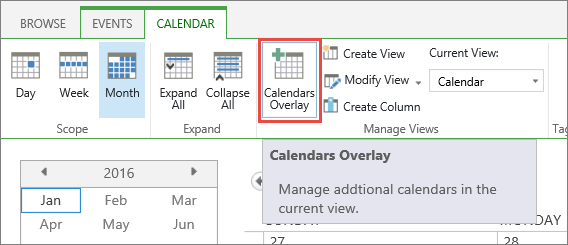
  1. In a SharePoint calendar, in the ribbon, on the Calendar tab, click Calendar Overlays.
    Calendar Overaly button on ribbon
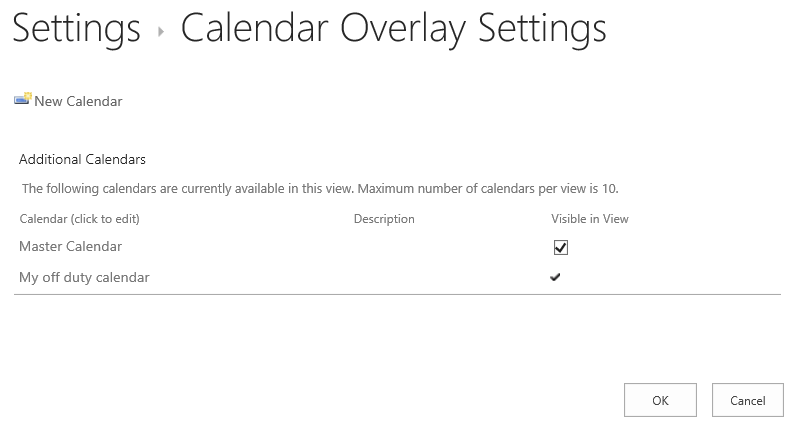
  2. In the Calendar Overlay Settings page, click New Calendar.
    Calendar Overaly button on ribbon
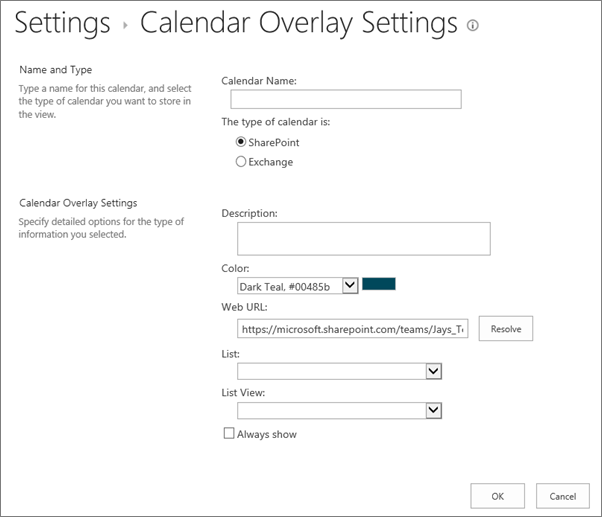
  3. In the Name and Type section, type the Calendar Name and select Exchange.
    Calendar overlay create calendar dialog box.
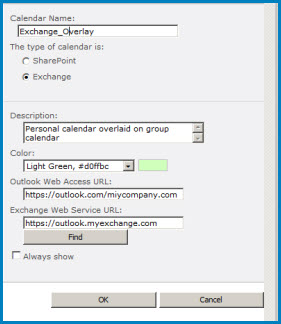
  4. In the Calendar Overlay Settings section, type a Description for the calendar (optional), and change the default Color theme for the calendar (optional).
    Screenshot of the Calendar Overlay dialog box in SharePoint. The dialog box shows the Calendar name, calendar type (Exchange), and gives the URLs for Outlook Web Access and Exchange Web Access.
  5. Click Find to automatically fill in web addresses for Outlook Web Access URL and Exchange Web Service URL. If Find does not work in your environment, type the URLs manually.
  6. If you want this Exchange calendar to always appear with the SharePoint group calendar, click Always Show. When Always Show is not checked, you will be able to turn overlays on and off from the page. If it is checked, the overlay calendar will always appear on the page's calendar.
  7. Click OK and then click OK again.

See Also


Wednesday, August 3, 2016

Set Language and Time Zone for all Office 365 users

Set Language and Time Zone for all Office 365 users

According to
https://technet.microsoft.com/en-us/library/dd351103(v=exchg.160).aspx
https://msdn.microsoft.com/en-us/library/system.globalization.cultureinfo(VS.71).aspx

Using PowerShell
Connecting to Office 365
$UserCredential = Get-Credential

Set-executionpolicy unrestricted

$Session = New-PSSession -ConfigurationName Microsoft.Exchange -ConnectionUri https://outlook.office365.com/powershell-liveid/ -Credential $UserCredential -Authentication Basic -AllowRedirection


Import-PSSession $Session


Set Language and Time Zone for all Office 365 users


get-mailbox | Set-MailboxRegionalConfiguration -Language  -TimeZone
Example for French Canada from Eastern Standard Time for Quebec Canada: 

get-mailbox | Set-MailboxRegionalConfiguration -Language fr-CA -TimeZone "Eastern Standard Time"

or

Get-Mailbox | Set-MailboxRegionalConfiguration -Language en-US -TimeZone "Eastern Standard Time"


According to the Language and Time zone code lists below: 

Language Culture Name


Culture NameCulture IdentifierLanguage-Country/Region
"" (empty string)0x007Finvariant culture
af0x0036Afrikaans
af-ZA0x0436Afrikaans - South Africa
sq0x001CAlbanian
sq-AL0x041CAlbanian - Albania
ar0x0001Arabic
ar-DZ0x1401Arabic - Algeria
ar-BH0x3C01Arabic - Bahrain
ar-EG0x0C01Arabic - Egypt
ar-IQ0x0801Arabic - Iraq
ar-JO0x2C01Arabic - Jordan
ar-KW0x3401Arabic - Kuwait
ar-LB0x3001Arabic - Lebanon
ar-LY0x1001Arabic - Libya
ar-MA0x1801Arabic - Morocco
ar-OM0x2001Arabic - Oman
ar-QA0x4001Arabic - Qatar
ar-SA0x0401Arabic - Saudi Arabia
ar-SY0x2801Arabic - Syria
ar-TN0x1C01Arabic - Tunisia
ar-AE0x3801Arabic - United Arab Emirates
ar-YE0x2401Arabic - Yemen
hy0x002BArmenian
hy-AM0x042BArmenian - Armenia
az0x002CAzeri
az-AZ-Cyrl0x082CAzeri (Cyrillic) - Azerbaijan
az-AZ-Latn0x042CAzeri (Latin) - Azerbaijan
eu0x002DBasque
eu-ES0x042DBasque - Basque
be0x0023Belarusian
be-BY0x0423Belarusian - Belarus
bg0x0002Bulgarian
bg-BG0x0402Bulgarian - Bulgaria
ca0x0003Catalan
ca-ES0x0403Catalan - Catalan
zh-HK0x0C04Chinese - Hong Kong SAR
zh-MO0x1404Chinese - Macau SAR
zh-CN0x0804Chinese - China
zh-CHS0x0004Chinese (Simplified)
zh-SG0x1004Chinese - Singapore
zh-TW0x0404Chinese - Taiwan
zh-CHT0x7C04Chinese (Traditional)
hr0x001ACroatian
hr-HR0x041ACroatian - Croatia
cs0x0005Czech
cs-CZ0x0405Czech - Czech Republic
da0x0006Danish
da-DK0x0406Danish - Denmark
div0x0065Dhivehi
div-MV0x0465Dhivehi - Maldives
nl0x0013Dutch
nl-BE0x0813Dutch - Belgium
nl-NL0x0413Dutch - The Netherlands
en0x0009English
en-AU0x0C09English - Australia
en-BZ0x2809English - Belize
en-CA0x1009English - Canada
en-CB0x2409English - Caribbean
en-IE0x1809English - Ireland
en-JM0x2009English - Jamaica
en-NZ0x1409English - New Zealand
en-PH0x3409English - Philippines
en-ZA0x1C09English - South Africa
en-TT0x2C09English - Trinidad and Tobago
en-GB0x0809English - United Kingdom
en-US0x0409English - United States
en-ZW0x3009English - Zimbabwe
et0x0025Estonian
et-EE0x0425Estonian - Estonia
fo0x0038Faroese
fo-FO0x0438Faroese - Faroe Islands
fa0x0029Farsi
fa-IR0x0429Farsi - Iran
fi0x000BFinnish
fi-FI0x040BFinnish - Finland
fr0x000CFrench
fr-BE0x080CFrench - Belgium
fr-CA0x0C0CFrench - Canada
fr-FR0x040CFrench - France
fr-LU0x140CFrench - Luxembourg
fr-MC0x180CFrench - Monaco
fr-CH0x100CFrench - Switzerland
gl0x0056Galician
gl-ES0x0456Galician - Galician
ka0x0037Georgian
ka-GE0x0437Georgian - Georgia
de0x0007German
de-AT0x0C07German - Austria
de-DE0x0407German - Germany
de-LI0x1407German - Liechtenstein
de-LU0x1007German - Luxembourg
de-CH0x0807German - Switzerland
el0x0008Greek
el-GR0x0408Greek - Greece
gu0x0047Gujarati
gu-IN0x0447Gujarati - India
he0x000DHebrew
he-IL0x040DHebrew - Israel
hi0x0039Hindi
hi-IN0x0439Hindi - India
hu0x000EHungarian
hu-HU0x040EHungarian - Hungary
is0x000FIcelandic
is-IS0x040FIcelandic - Iceland
id0x0021Indonesian
id-ID0x0421Indonesian - Indonesia
it0x0010Italian
it-IT0x0410Italian - Italy
it-CH0x0810Italian - Switzerland
ja0x0011Japanese
ja-JP0x0411Japanese - Japan
kn0x004BKannada
kn-IN0x044BKannada - India
kk0x003FKazakh
kk-KZ0x043FKazakh - Kazakhstan
kok0x0057Konkani
kok-IN0x0457Konkani - India
ko0x0012Korean
ko-KR0x0412Korean - Korea
ky0x0040Kyrgyz
ky-KZ0x0440Kyrgyz - Kazakhstan
lv0x0026Latvian
lv-LV0x0426Latvian - Latvia
lt0x0027Lithuanian
lt-LT0x0427Lithuanian - Lithuania
mk0x002FMacedonian
mk-MK0x042FMacedonian - FYROM
ms0x003EMalay
ms-BN0x083EMalay - Brunei
ms-MY0x043EMalay - Malaysia
mr0x004EMarathi
mr-IN0x044EMarathi - India
mn0x0050Mongolian
mn-MN0x0450Mongolian - Mongolia
no0x0014Norwegian
nb-NO0x0414Norwegian (Bokml) - Norway
nn-NO0x0814Norwegian (Nynorsk) - Norway
pl0x0015Polish
pl-PL0x0415Polish - Poland
pt0x0016Portuguese
pt-BR0x0416Portuguese - Brazil
pt-PT0x0816Portuguese - Portugal
pa0x0046Punjabi
pa-IN0x0446Punjabi - India
ro0x0018Romanian
ro-RO0x0418Romanian - Romania
ru0x0019Russian
ru-RU0x0419Russian - Russia
sa0x004FSanskrit
sa-IN0x044FSanskrit - India
sr-SP-Cyrl0x0C1ASerbian (Cyrillic) - Serbia
sr-SP-Latn0x081ASerbian (Latin) - Serbia
sk0x001BSlovak
sk-SK0x041BSlovak - Slovakia
sl0x0024Slovenian
sl-SI0x0424Slovenian - Slovenia
es0x000ASpanish
es-AR0x2C0ASpanish - Argentina
es-BO0x400ASpanish - Bolivia
es-CL0x340ASpanish - Chile
es-CO0x240ASpanish - Colombia
es-CR0x140ASpanish - Costa Rica
es-DO0x1C0ASpanish - Dominican Republic
es-EC0x300ASpanish - Ecuador
es-SV0x440ASpanish - El Salvador
es-GT0x100ASpanish - Guatemala
es-HN0x480ASpanish - Honduras
es-MX0x080ASpanish - Mexico
es-NI0x4C0ASpanish - Nicaragua
es-PA0x180ASpanish - Panama
es-PY0x3C0ASpanish - Paraguay
es-PE0x280ASpanish - Peru
es-PR0x500ASpanish - Puerto Rico
es-ES0x0C0ASpanish - Spain
es-UY0x380ASpanish - Uruguay
es-VE0x200ASpanish - Venezuela
sw0x0041Swahili
sw-KE0x0441Swahili - Kenya
sv0x001DSwedish
sv-FI0x081DSwedish - Finland
sv-SE0x041DSwedish - Sweden
syr0x005ASyriac
syr-SY0x045ASyriac - Syria
ta0x0049Tamil
ta-IN0x0449Tamil - India
tt0x0044Tatar
tt-RU0x0444Tatar - Russia
te0x004ATelugu
te-IN0x044ATelugu - India
th0x001EThai
th-TH0x041EThai - Thailand
tr0x001FTurkish
tr-TR0x041FTurkish - Turkey
uk0x0022Ukrainian
uk-UA0x0422Ukrainian - Ukraine
ur0x0020Urdu
ur-PK0x0420Urdu - Pakistan
uz0x0043Uzbek
uz-UZ-Cyrl0x0843Uzbek (Cyrillic) - Uzbekistan
uz-UZ-Latn0x0443Uzbek (Latin) - Uzbekistan
vi0x002AVietnamese
vi-VN0x042AVietnamese - Vietnam


The TimeZone consists of a String representing the time zone.  Use the value from the middle column of the table below:


Index Name of Time Zone Time
000 Dateline Standard Time (GMT-12:00) International Date Line West
001 Samoa Standard Time (GMT-11:00) Midway Island, Samoa
002 Hawaiian Standard Time (GMT-10:00) Hawaii
003 Alaskan Standard Time (GMT-09:00) Alaska
004 Pacific Standard Time (GMT-08:00) Pacific Time (US and Canada); Tijuana
010 Mountain Standard Time (GMT-07:00) Mountain Time (US and Canada)
013 Mexico Standard Time 2 (GMT-07:00) Chihuahua, La Paz, Mazatlan
015 U.S. Mountain Standard Time (GMT-07:00) Arizona
020 Central Standard Time (GMT-06:00) Central Time (US and Canada
025 Canada Central Standard Time (GMT-06:00) Saskatchewan
030 Mexico Standard Time (GMT-06:00) Guadalajara, Mexico City, Monterrey
033 Central America Standard Time (GMT-06:00) Central America
035 Eastern Standard Time (GMT-05:00) Eastern Time (US and Canada)
040 U.S. Eastern Standard Time (GMT-05:00) Indiana (East)
045 S.A. Pacific Standard Time (GMT-05:00) Bogota, Lima, Quito
050 Atlantic Standard Time (GMT-04:00) Atlantic Time (Canada)
055 S.A. Western Standard Time (GMT-04:00) Caracas, La Paz
056 Pacific S.A. Standard Time (GMT-04:00) Santiago
060 Newfoundland and Labrador Standard Time (GMT-03:30) Newfoundland and Labrador
065 E. South America Standard Time (GMT-03:00) Brasilia
070 S.A. Eastern Standard Time (GMT-03:00) Buenos Aires, Georgetown
073 Greenland Standard Time (GMT-03:00) Greenland
075 Mid-Atlantic Standard Time (GMT-02:00) Mid-Atlantic
080 Azores Standard Time (GMT-01:00) Azores
083 Cape Verde Standard Time (GMT-01:00) Cape Verde Islands
085 GMT Standard Time (GMT) Greenwich Mean Time: Dublin, Edinburgh, Lisbon, London
090 Greenwich Standard Time (GMT) Casablanca, Monrovia
095 Central Europe Standard Time (GMT+01:00) Belgrade, Bratislava, Budapest, Ljubljana, Prague
100 Central European Standard Time (GMT+01:00) Sarajevo, Skopje, Warsaw, Zagreb
105 Romance Standard Time (GMT+01:00) Brussels, Copenhagen, Madrid, Paris
110 W. Europe Standard Time (GMT+01:00) Amsterdam, Berlin, Bern, Rome, Stockholm, Vienna
113 W. Central Africa Standard Time (GMT+01:00) West Central Africa
115 E. Europe Standard Time (GMT+02:00) Bucharest
120 Egypt Standard Time (GMT+02:00) Cairo
125 FLE Standard Time (GMT+02:00) Helsinki, Kiev, Riga, Sofia, Tallinn, Vilnius
130 GTB Standard Time (GMT+02:00) Athens, Istanbul, Minsk
135 Israel Standard Time (GMT+02:00) Jerusalem
140 South Africa Standard Time (GMT+02:00) Harare, Pretoria
145 Russian Standard Time (GMT+03:00) Moscow, St. Petersburg, Volgograd
150 Arab Standard Time (GMT+03:00) Kuwait, Riyadh
155 E. Africa Standard Time (GMT+03:00) Nairobi
158 Arabic Standard Time (GMT+03:00) Baghdad
160 Iran Standard Time (GMT+03:30) Tehran
165 Arabian Standard Time (GMT+04:00) Abu Dhabi, Muscat
170 Caucasus Standard Time (GMT+04:00) Baku, Tbilisi, Yerevan
175 Transitional Islamic State of Afghanistan Standard Time (GMT+04:30) Kabul
180 Ekaterinburg Standard Time (GMT+05:00) Ekaterinburg
185 West Asia Standard Time (GMT+05:00) Islamabad, Karachi, Tashkent
190 India Standard Time (GMT+05:30) Chennai, Kolkata, Mumbai, New Delhi
193 Nepal Standard Time (GMT+05:45) Kathmandu
195 Central Asia Standard Time (GMT+06:00) Astana, Dhaka
200 Sri Lanka Standard Time (GMT+06:00) Sri Jayawardenepura
201 N. Central Asia Standard Time (GMT+06:00) Almaty, Novosibirsk
203 Myanmar Standard Time (GMT+06:30) Yangon Rangoon
205 S.E. Asia Standard Time (GMT+07:00) Bangkok, Hanoi, Jakarta
207 North Asia Standard Time (GMT+07:00) Krasnoyarsk
210 China Standard Time (GMT+08:00) Beijing, Chongqing, Hong Kong SAR, Urumqi
215 Singapore Standard Time (GMT+08:00) Kuala Lumpur, Singapore
220 Taipei Standard Time (GMT+08:00) Taipei
225 W. Australia Standard Time (GMT+08:00) Perth
227 North Asia East Standard Time (GMT+08:00) Irkutsk, Ulaanbaatar
230 Korea Standard Time (GMT+09:00) Seoul
235 Tokyo Standard Time (GMT+09:00) Osaka, Sapporo, Tokyo
240 Yakutsk Standard Time (GMT+09:00) Yakutsk
245 A.U.S. Central Standard Time (GMT+09:30) Darwin
250 Cen. Australia Standard Time (GMT+09:30) Adelaide
255 A.U.S. Eastern Standard Time (GMT+10:00) Canberra, Melbourne, Sydney
260 E. Australia Standard Time (GMT+10:00) Brisbane
265 Tasmania Standard Time (GMT+10:00) Hobart
270 Vladivostok Standard Time (GMT+10:00) Vladivostok
275 West Pacific Standard Time (GMT+10:00) Guam, Port Moresby
280 Central Pacific Standard Time (GMT+11:00) Magadan, Solomon Islands, New Caledonia
285 Fiji Islands Standard Time (GMT+12:00) Fiji Islands, Kamchatka, Marshall Islands
290 New Zealand Standard Time (GMT+12:00) Auckland, Wellington

300 Tonga Standard Time (GMT+13:00) Nuku’alofa


Featured Posts

Exchange Online Limits - Office 365 Distribution group limits

Exchange Online Limits - Office 365 Distribution group limits What are Exchange Online Limits What are Office 365 Distribution group limi...