Monday, April 27, 2020

List of WordPress multisite compatible plugins

List of WordPress multisite compatible plugins

Plugin NameURL and Description
Akismethttps://de.wordpress.org/plugins/akismet/
Protects against spam comments.
Antispam Beehttps://de.wordpress.org/plugins/antispam-bee/
Protects against spam comments, GDPR compliant alternative for Akismet
BackWPuphttps://backwpup.de
Backup-plugin with restore functionality and multisite features. Multisite backup possible.
Broken Link Checkerhttps://wordpress.org/plugins/broken-link-checker/
Finds incorrect links on your website. Passive multiste compatible.
Contact Form 7https://wordpress.org/plugins/contact-form-7/
The most popular plugin to create contact forms.
GDPR Cookie Consenthttps://wordpress.org/plugins/cookie-law-info/
Formerly "Cookie Law Info". Displays a cookie information. Passive multisite compatible.
Imagifyhttps://wordpress.org/plugins/imagify/
Lossless picture optimization to improve the performance of your website.
Jetpackhttps://wordpress.org/plugins/jetpack/
A plugin made by Automattic, the provider of WordPress with many modules like site statistics, marketing and security features.
MailChimp for WordPresshttps://wordpress.org/plugins/mailchimp-for-wp/
Connects your website with your Mailchimp account and provides forms with which you can collect newsletter subscriptions.
Monster Insightshttps://wordpress.org/plugins/google-analytics-for-wordpress/
Integrates Google Analytics into your website, ecommerce tracking in its pro version.
MultilingualPresshttps://multilingualpress.de
Our plugin for performant multilingual websites based on WordPress multisite.
NextGen Galleryhttps://de.wordpress.org/plugins/nextgen-gallery/
The most popular plugin to create galleries.
Optimushttps://de.wordpress.org/plugins/optimus/
A plugin to optimize pictures, like Imagify.
Redirectionhttps://de.wordpress.org/plugins/redirection/
Setup 301 redirections in the WordPress backend. Capable to implement all regular expressions.
Search & Replacehttps://de.wordpress.org/plugins/search-and-replace/
Enables to search and replace character strings in the database. Database backup and database restore inclusively.
SEOPresshttps://wordpress.org/plugins/wp-seopress/
A powerfull SEO plugin which helps you optimize your site.
Streamhttps://de.wordpress.org/plugins/stream/
Monitoring of user activities in WordPress multisite.
User Switchinghttps://de.wordpress.org/plugins/user-switching/
Allows the simple switching of the admin into the profile of another website user.
W3 Total Cachehttps://de.wordpress.org/plugins/w3-total-cache/
Caching plugin for WordPress. Improves the website performance and therefore the SEO and the user experience.
WooCommercehttps://woocommerce.com/
THE ecommerce solution for WordPress. Many free and fee-based extensions available.
Wordfence Securityhttps://de.wordpress.org/plugins/wordfence/
Security checks and measures for your website like firewall, scans of data, prevention of brute force attacs.
Yoast SEOhttps://de.wordpress.org/plugins/wordpress-seo/
The most famous search engine optimization plugin for WordPress helps you increase traffic to your site.

NEW! MultilingualPress Yoast SEO Sync available for free on Github - This is a simple add-on for the MultilingualPress 3 plugin to synchronize the post metadata of the Yoast SEO plugin between translated posts.


IT Consultant

Saturday, April 25, 2020

Flush DNS

Flush DNS
As addressed at https://support.pearson.com/getsupport/s/article/Reset-an-Internet-Connection-Flush-DNS


Reset an Internet Connection (Flush DNS)

How to reset your Internet connection by flushing the DNS of your connection.
Aug 1, 2019•Knowledge


Issue
I'm having problems accessing Pearson websites or programs and I've already tried all Recommended Browser Settings.
Looking for other Pearson Tech Support help? See the General Tech Support Troubleshooting overview page to learn more.
FAQ
How do I flush the DNS or reset my computer's connection to the Internet?

The instructions to flush your DNS are different depending on your computer, see the section below for instructions that fit your setup.
Detailed Instructions
If you have cleared your browser's temporary files and cookies and adjusted your settings, there may be an issue with the way the network is configured. To correct it, please flush and reset the DNS by following the instructions below. You may also need to restart your modem and/or router (sometimes referred to as a power cycle).
Note: If you are using a public or shared computer, you may need to ask a network administrator to perform these steps.

Choose your computers operating system to see detailed instructions:
Windows 10, 8 and 8.1
Windows 7
Windows XP and Vista
Mac OS X
Windows
Note: These instructions will require you to use the Windows command prompt. For information about using the command prompt, please visit http://windows.microsoft.com/en-us/windows/command-prompt-faq.
Windows 10. 8 and 8.1
Navigate to the desktop. (From Home, tap or click the Desktop tile).
Right-click the Start button (the Windows logo in the lower-left).
Choose Command Prompt (Admin).
When asked whether to allow Command Prompt to make changes to your computer, select Yes.

Note: If you are asked for an administrative login, you will need to contact your system administrator.
Type "ipconfig /flushdns" and press Enter.
Type "ipconfig /registerdns" and press Enter.
Type "ipconfig /release" and press Enter.
Type "ipconfig /renew" and press Enter.
Type "netsh winsock reset" and press Enter.
Restart the computer.
Windows 7
Click Start > All Programs > Accessories.
Right-click Command Prompt and choose Run as administrator.
When asked whether to allow Command Prompt to make changes to your computer, select Yes.

Note: If you are asked for an administrative login, you will need to contact your system administrator.
Type "ipconfig /flushdns" and press Enter.
Type "ipconfig /registerdns" and press Enter.
Type "ipconfig /release" and press Enter.
Type "ipconfig /renew" and press Enter.
Type "netsh winsock reset" and press Enter.
Restart the computer.
XP and Vista
Close all browser windows.
Click Start > All Programs > Accessories > Command Prompt.
Type the following at the command prompt: ipconfig /flushdns
If the command was successful, you will see the message, "DNS Resolver Cache Successfully Flushed."
If you receive the message, "Action Requires Elevation" please contact the administrator of your computer to complete these steps.
Mac OS X
Close all browser windows.
Click Applications > Utilities > Terminal.
In the Terminal window, type in the corresponding command for your Mac OS X version:
OS X 10.10 (Yosemite): sudo discoveryutil mdnsflushcache
OS X 10.7 - 10.9 (Mavericks, Mountain Lion, and Lion): sudo killall -HUP mDNSResponder
OS X 10.6 and older: sudo dscacheutil -flushcache
Press Enter again and the DNS cache should be flushed.
Additional Steps
If the steps above do not resolve the issue, and you are on a home network, you may need to run a power cycle:
Turn off your computer.
Turn off your modem and router (if you have one), then wait for about 15 seconds.
Plug in your modem, then wait for 1-2 minutes.
Plug in your router (if you have one), then wait for 1-2 minutes.

Turn on your computer.
IT Consultant

www.inCOREporation.com

Friday, April 24, 2020

Wordpress Development (Getting started)

Wordpress Development (Getting started)


Side notes:
(Cloud server wordpress installation with Chris Tutis
  https://youtu.be/vIJdypOqlL4 and/or https://youtu.be/cG9kv5-5bPI )
Mesure website performance: GTmetrix.com
CDN CloudFlare.com


Local Installation Wordpress


ServerPress (Serverpress)
https://serverpress.com/get-desktopserver/
Troubleshoot port used https://serverpress.com/solutions/cports.zip
Mac Version https://www.dropbox.com/s/7lg9k97zbpyn6g0/dsl-mac-v394.dmg?dl=0
Open from /Applications/XAMPP
Create site
Username
Password https://www.md5hashgenerator.com/


and/or

Local by Flywheel (Mac, Windows)
https://localwp.com/


When installing Wordpress on your own computer, do not install any of the following types of plugins until you move your site online:


  1. Wordpress security plugins, e.g. Wordfence, All-In.One Security, Stop Spammers.
  2. Caching plugins, e.g. W3 Total Cache
  3. Contact Form plugins like Contact Form 7 may work OK, but may not.  This one should not cause installation issues, but don't be surprised if it does not work properly.


On Mac, Because MySQL was already installed, DesktopServer serverpress couldn't install and was requesting to uninstall the current version of MySQL (maybe from the OS or Local by Flywheeel):
Managing MySQL
On Mac Os X 10.15.X
Backup MySQL database
From terminal

mysqldump -u root -p --all-databases > macmastermysqlold.sql

Stop MySQL service
sudo launchctl unload -F /Library/LaunchDaemons/com.oracle.oss.mysql.mysqld.plist
Uninstall MySql from MacOS X

Resolution

To uninstall MySQL and completely remove it (including all databases) from your Mac do the following:
  • Open a terminal window
  • Use mysqldump to backup your databases to text files!
  • Stop the database server
  • sudo rm /usr/local/mysql
  • sudo rm -rf /usr/local/mysql*
  • sudo rm -rf /Library/StartupItems/MySQLCOM
  • sudo rm -rf /Library/PreferencePanes/My*
  • edit /etc/hostconfig and remove the line MYSQLCOM=-YES-
  • rm -rf ~/Library/PreferencePanes/My*
  • sudo rm -rf /Library/Receipts/mysql*
  • sudo rm -rf /Library/Receipts/MySQL*
  • sudo rm -rf /private/var/db/receipts/*mysql*
The last three lines are particularly important as otherwise, you can't install an older version of MySQL even though you think that you've completely deleted the newer version!


Web

Finding a domain [[ Domain name analyzer ]]
Online brainstorming, verify and purchase at WWebServices.ca or DandyHosting.com


WORDPRESS PLUGINS (MORE)

YOAST SEO
CI BACKLINKS (when change config empty cache and go to xml-sitemaps.com internal links analyzer tool https://www.youtube.com/watch?v=jMmhg2n5LGs)
WordPress Calls to Action (CTA PRO)
LIGHTSPEED CACHE


Content library (wordpress themes, graphics, photos, videos, music, sound, etc)

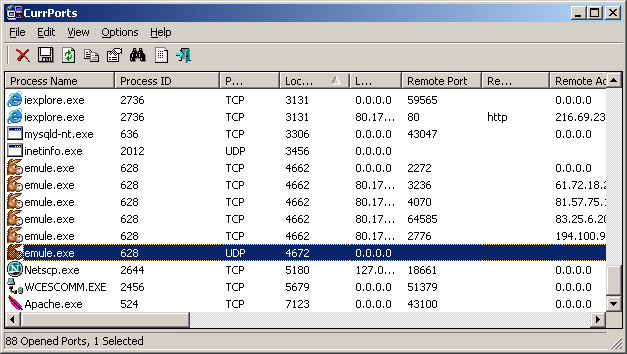
NirSoft Currport IT Network Tools

NirSoft Currport IT Network Tools
Cool tools from NirSoft as per:

https://www.nirsoft.net/utils/cports.html


CurrPorts v2.61 - Monitoring Opened TCP/IP network ports / connections
Copyright (c) 2004 - 2020 Nir Sofer

Related Utilities

See Also

  • NK2Edit - Edit, merge and fix the AutoComplete files (.NK2) of Microsoft Outlook.

Description

CurrPorts is network monitoring software that displays the list of all currently opened TCP/IP and UDP ports on your local computer. For each port in the list, information about the process that opened the port is also displayed, including the process name, full path of the process, version information of the process (product name, file description, and so on), the time that the process was created, and the user that created it.
In addition, CurrPorts allows you to close unwanted TCP connections, kill the process that opened the ports, and save the TCP/UDP ports information to HTML file , XML file, or to tab-delimited text file.
CurrPorts also automatically mark with pink color suspicious TCP/UDP ports owned by unidentified applications (Applications without version information and icons)

Notice !

  • When the 'Use DNS Cache For Host Names' option is turned on, there is a significant memory leak on every refresh. This memory leak is not caused directly by CurrPorts, but by the DNS cache programming interface of Windows. Currently, I cannot find a workaround for this problem, so if you run CurrPorts for many hours in automatic refresh mode, it's recommended to turn off the 'Use DNS Cache For Host Names' option.
  • If you want to monitor UDP activity, you should try using the LiveTcpUdpWatch tool.


IT Consultant
www.inCOREporation.com

Thursday, April 9, 2020

Quelle est la meilleure plateforme e-commerce pour une petite entreprise ?

Pour les petites et moyenne entreprise, une plateforme très simplifiée, assez complète et flexible (on peut mettre le code sur plusieurs sites web[1] Ã  la fois comme, Wordpress[2], ou autre plateforme "drag and drop" comme Weebly[3] et réseaux sociaux Facebook, etc). Le tout est géré de façon centralisé alors tous les modifications de produits, inventaire, comptes, etc, restent synchroniser sur tous les sites à la fois!
Voilà pourquoi cette solution abordable gagne plusieurs PME / SMB, avec beaucoup de raisons, et il y a meme un plan gratuit! Donc on peut l'essayer dès maintenant:
et laissez-moi savoir si vous avez des questions. Essayez-le et donnez-moi votre commentaire.
Notes de bas de page

Wednesday, April 8, 2020

Comment créer une adresse mail personnalisée ?

Pour créer une adresse email personnalisée, cela prend

Premièrement un nom de domaine unique, que l'on doit enregistré et renouveler chaque année, exemple https://WWebServices.ca/ (←très abordable)
Une fois que vous avez trouvé un nom disponible exemple MonSiteWeb.com et "acheté" ce nom de domaine, vous serez en mesure d'y ajouter des services reliés comme les emails sur lequel on ajoute des noms d'utilisateurs, exemple:
Avik.Paul@MonSiteWeb.com
Maintenant il y a plusieurs options de plateformes (serveurs) email, pour en nommer quelques-une:
  1. Microsoft , le serveur peut être hébergé soit à l'entreprise, ou dans les centre de données Microsoft / Office 365 pour affaire/ entreprise, ou il est possible de faire les 2 à la fois, ce qu'on appel hybrid, avoir le serveur email à la propriété de l'entreprise, qui peut à la fois être dans la bâtisse, ou dans leur Cloud privé, et synchroniser avec les services Office 365 dans le Cloud. (vous devez contacter un consultant certifié Microsoft qui offre les produits et le service d'administration email, comme inCOREporation Connection ou encore sur INCOREPORATION )
  2. Google G-Suite. Il y plusieurs options ici, soit un service de base que vous gérez vous même comme sur G Suite (formerly Google Apps for Work) ou les services avancés, encore une fois vous aurez besoin de faire recours à un consultant comme inCOREporation Connection ou encore sur INCOREPORATION qui est aussi certifié Google.
  3. Et finalement, les services emails disponibles souvent sur les serveurs Linux (peut aussi être windows) en hébergement partagé, les emails sont parfois aussi compris dans les plans d'hébergements web https://WWebServices.ca/ (https://WWebServices.ca/) (←très abordable), à partir duquel on retrouve un espace inclus pour gérer ses services, communément appelé CPanel (encore il y a toujours des options pratiquement à chaque étape que je vous décrit).
  4. Ou encore tout simplement acheter des boîtes emails au besoin, exemple encore sur WWebServices.ca ;
    Business email: Business Email
    Enterprise email: Enterprise Email
Rappelez vous que tout commence par le nom de domaine que vous avez réussi à acheter à WWebServices.ca

Une fois cette étape franchie, on doit configurer le(s) serveurs, gérer et maintenir les utilisateurs et l'infrastructure. Certain services offrent des outils de collaboration supérieur, ce qui explique les différence de prix, selon les besoins. Suite à ce point ca devient trop complexe pour expliquer en un court texte.

Vous pouvez communiquez inCOREporation Connection il y a un chat en bas à gauche, ou je peux aider avec ce que vous recherchez.

Sunday, April 5, 2020

Postal codes Montreal Island

Portal code Montreal island

The full list of postal codes for the Island of Montreal is:
(See below for web programming, e-commerce, delivery)
H0A
Not assigned
H1A
Pointe-aux-Trembles
H2A
Saint Michel
East
H3A
Downtown Montreal
North (McGill University)
H4A
Our Lady of Grace
Northeast
H5A
Place Bonaventure
H7A
Duvernay-Est
H8A
Not assigned
H9A
Dollard-Des-
Abalone
North West
H0B
Not assigned
H1B
Montreal East
H2B
Ahuntsic
North
H3B
Downtown Montreal
East
H4B
Our Lady of Grace
South West
H5B
Desjardins complex
H7B
St. Francis
H8B
Not assigned
H9B
Dollard-Des-
Abalone
East
H0C
Not assigned
H1C
Rivière-des-Prairies
Northeast
H2C
Ahuntsic
Center
H3C
Griffintown
(Including Île Notre-Dame & Île Sainte-Hélène)
(Montreal university)
H4C
Saint-Henri
H5C
Not assigned
H7C
Saint-Vincent-de-Paul
H8C
Not assigned
H9C
L'ÃŽle-Bizard
Northeast
H0E
Not assigned
H1E
Rivière-des-Prairies
South West
H2E
Villeray
Northeast
H3E
Nuns' Island
H4E
City Émard
H5E
Not assigned
H7E
Duvernay
H8E
Not assigned
H9E
L'ÃŽle-Bizard
South West
H0G
Not assigned
H1G
Montreal North
North
H2G
Petite-Patrie
Northeast
H3G
Downtown Montreal
Southeast (Concordia University)
H4G
Verdun
North
H5G
Not assigned
H7G
Pont-Viau
H8G
Not assigned
H9G
Dollard-Des-
Abalone
South West
H0H
Reserve
(Santa Claus)
H1H
Montreal North
South
H2H
Plateau Mont-Royal
North
H3H
Downtown Montreal
South West
H4H
Verdun
South
H5H
Not assigned
H7H
Auteuil
Where is
H8H
Not assigned
H9H
Sainte-Geneviève
H0J
Not assigned
H1J
Anjou
West
H2J
Plateau Mont-Royal
North center
H3J
Little Burgundy
H4J
Cartierville
Center
H5J
Not assigned
H7J
Auteuil
Northeast
H8J
Not assigned
H9J
Kirkland
H0K
Not assigned
H1K
Anjou
East
H2K
Center-South
North
H3K
Pointe Saint-Charles
H4K
Cartierville
South West
H5K
Not assigned
H7K
Auteuil
South
H8K
Not assigned
H9K
Senneville
H0L
Not assigned
H1L
Mercier
North
H2L
Center-South
South
H3L
Ahuntsic
South West
H4L
Saint Laurent
Northeast interior
H5L
Not assigned
H7L
Sainte-Rose
H8L
Not assigned
H9L
Not assigned
H0M
Akwesasne region
(Akwesasne)
H1M
Mercier
Where is
H2M
Ahuntsic
East
H3M
Cartierville
Northeast
H4M
Saint Laurent
East
H5M
Not assigned
H7M
Vimont
H8M
Not assigned
H9M
Not assigned
H0N
Not assigned
H1N
Mercier
South East
H2N
Ahuntsic
South East
H3N
Parc-Extension
H4N
Saint Laurent
Northeast exterior
H5N
Not assigned
H7N
Laval-des-Rapides
H8N
The room
North West
H9N
Not assigned
H0P
Not assigned
H1P
Saint leonard
North
H2P
Villeray
Where is
H3P
Mont Royal
North
H4P
Mont Royal
South
H5P
Not assigned
H7P
Fabreville
H8P
The room
South East
H9P
Dorval
Outside
H0R
Not assigned
H1R
Saint leonard
Where is
H2R
Villeray
South East
H3R
Mont Royal
Center
H4R
Saint Laurent
Center
H5R
Not assigned
H7R
Laval-sur-le-Lac
H8R
City Saint-Pierre
H9R
Pointe-Claire
H0S
Not assigned
H1S
Saint leonard
South East
H2S
Petite-Patrie
South West
H3S
Côte-des-Neiges
North
H4S
Saint Laurent
South West
H5S
Not assigned
H7S
Chomedey
Northeast
H8S
China
East
H9S
L'ÃŽle-Dorval
H0T
Not assigned
H1T
Rosemont
North
H2T
Plateau Mont-Royal
West
H3T
Côte-des-Neiges
Northeast
H4T
Saint Laurent
South East
H5T
Not assigned
H7T
Chomedey
North West
H8T
China
Where is
H9T
Not assigned
H0V
Not assigned
H1V
Maisonneuve
H2V
Outremont
H3V
Côte-des-Neiges
East
H4V
Côte-Saint-Luc
East
H5V
Not assigned
H7V
Chomedey
East
H8V
Not assigned
H9V
Not assigned
H0W
Not assigned
H1W
Hochelaga
H2W
Plateau Mont-Royal
South Center
H3W
Côte-des-Neiges
South West
H4W
Côte-Saint-Luc
Where is
H5W
Not assigned
H7W
Chomedey
South
H8W
Not assigned
H9W
Beaconsfield
H0X
Not assigned
H1X
Rosemont
Center
H2X
Plateau Mont-Royal
South East
H3X
Hampstead
H4X
Montreal West
H5X
Not assigned
H7X
Sainte-Dorothée
H8X
Not assigned
H9X
Sainte-Anne-de-
Nice view
H0Y
Not assigned
H1Y
Rosemont
South
H2Y
Old Montreal
H3Y
Westmount
North
H4Y
Dorval
Center (YUL)
H5Y
Not assigned
H7Y
ÃŽles-Laval
H8Y
Roxboro
H9Y
Not assigned
H0Z
Not assigned
H1Z
Saint Michel
Where is
H2Z
Downtown Montreal
Northeast
H3Z
Westmount
South
H4Z
Stock Exchange Tower
H5Z
Not assigned
H7Z
Not assigned
H8Z
Pierrefonds
H9Z
Not assigned
=====================================
So in the context of web programming, more specifically e-commerce where the delivery costs must agree according to the postal codes of the Island of Montreal, we would find this list as follows:
H1A *
H2A *
H3A *
H4A *
H5A *
H9A *
H1B *
H2B *
H3B *
H4B *
H5B *
H9B *
H1C *
H2C *
H3C *
H4C *
H1E *
H2E *
H3E *
H4E *
H1G *
H2G *
H3G *
H4G *
H9G *
H1H *
H2H *
H3H *
H4H *
H9H *
H1J *
H2J *
H3J *
H4J *
H9J *
H1K *
H2K *
H3K *
H4K *
H9K *
H1L *
H2L *
H3L *
H4L *
H1M *
H2M *
H3M *
H4M *
H1N *
H2N *
H3N *
H4N *
H8N *
H1P *
H2P *
H3P *
H4P *
H8P *
H9P *
H1R *
H2R *
H3R *
H4R *
H8R *
H9R *
H1S *
H2S *
H3S *
H4S *
H8S *
H9S *
H1T *
H2T *
H3T *
H4T *
H8T *
H1V *
H2V *
H3V *
H4V *
H1W *
H2W *
H3W *
H4W *
H9W *
H1X *
H2X *
H3X *
H4X *
H9X *
H1Y *
H2Y *
H3Y *
H4Y *
H8Y *
H1Z *
H2Z *
H3Z *
H4Z *
H8Z *
For more info you can find me at
www.inCOREporation.com (http://incoreporation.com)

Codes postaux île de Montréal (Code postal Montréal)

Codes postaux île de Montréal (Code postal Montréal)


La liste complète des code postaux de l'île de Montréal est:
(Voir plus bas pour dans un contexte de programmation web, e-commerce , livraison)
H0A
Non assigné
H1A
Pointe-aux-Trembles
H2A
Saint-Michel
Est
H3A
Centre-ville de Montréal
Nord (Université McGill)
H4A
Notre-Dame-de-Grâce
Nord-est
H5A
Place Bonaventure
H7A
Duvernay-Est
H8A
Non assigné
H9A
Dollard-Des-
Ormeaux
Nord-ouest
H0B
Non assigné
H1B
Montréal-Est
H2B
Ahuntsic
Nord
H3B
Centre-ville de Montréal
East
H4B
Notre-Dame-de-Grâce
Sud-ouest
H5B
Complexe Desjardins
H7B
Saint-François
H8B
Non assigné
H9B
Dollard-Des-
Ormeaux
Est
H0C
Non assigné
H1C
Rivière-des-Prairies
Nord-est
H2C
Ahuntsic
Centre
H3C
Griffintown
(Incluant Île Notre-Dame& Île Sainte-Hélène)
(Université de Montréal)
H4C
Saint-Henri
H5C
Non assigné
H7C
Saint-Vincent-de-Paul
H8C
Non assigné
H9C
L'ÃŽle-Bizard
Nord-est
H0E
Non assigné
H1E
Rivière-des-Prairies
Sud-ouest
H2E
Villeray
Nord-est
H3E
Île des Sœurs
H4E
Ville Émard
H5E
Non assigné
H7E
Duvernay
H8E
Non assigné
H9E
L'ÃŽle-Bizard
Sud-ouest
H0G
Non assigné
H1G
Montréal-Nord
Nord
H2G
Petite-Patrie
Nord-est
H3G
Centre-ville de Montréal
Sud-est (Université Concordia)
H4G
Verdun
Nord
H5G
Non assigné
H7G
Pont-Viau
H8G
Non assigné
H9G
Dollard-Des-
Ormeaux
Sud-ouest
H0H
Réservé
(Père Noël)
H1H
Montréal-Nord
South
H2H
Plateau Mont-Royal
Nord
H3H
Centre-ville de Montréal
Sud-ouest
H4H
Verdun
Sud
H5H
Non assigné
H7H
Auteuil
Ouest
H8H
Non assigné
H9H
Sainte-Geneviève
H0J
Non assigné
H1J
Anjou
West
H2J
Plateau Mont-Royal
North Centre
H3J
Petite-Bourgogne
H4J
Cartierville
Centre
H5J
Non assigné
H7J
Auteuil
Nord-est
H8J
Non assigné
H9J
Kirkland
H0K
Non assigné
H1K
Anjou
Est
H2K
Centre-Sud
Nord
H3K
Pointe Saint-Charles
H4K
Cartierville
Sud-ouest
H5K
Non assigné
H7K
Auteuil
Sud
H8K
Non assigné
H9K
Senneville
H0L
Non assigné
H1L
Mercier
Nord
H2L
Centre-Sud
Sud
H3L
Ahuntsic
Sud-ouest
H4L
Saint-Laurent
Intérieur Nord-est
H5L
Non assigné
H7L
Sainte-Rose
H8L
Non assigné
H9L
Non assigné
H0M
Région d'Akwesasne
(Akwesasne)
H1M
Mercier
Ouest
H2M
Ahuntsic
Est
H3M
Cartierville
Nord-est
H4M
Saint-Laurent
Est
H5M
Non assigné
H7M
Vimont
H8M
Non assigné
H9M
Non assigné
H0N
Non assigné
H1N
Mercier
Sud-est
H2N
Ahuntsic
Sud-est
H3N
Parc-Extension
H4N
Saint-Laurent
Extérieur Nord-est
H5N
Non assigné
H7N
Laval-des-Rapides
H8N
LaSalle
Nord-ouest
H9N
Non assigné
H0P
Non assigné
H1P
Saint-Léonard
Nord
H2P
Villeray
Ouest
H3P
Mont-Royal
Nord
H4P
Mont-Royal
Sud
H5P
Non assigné
H7P
Fabreville
H8P
LaSalle
Sud-est
H9P
Dorval
Extérieur
H0R
Non assigné
H1R
Saint-Léonard
Ouest
H2R
Villeray
Sud-est
H3R
Mont-Royal
Centre
H4R
Saint-Laurent
Centre
H5R
Non assigné
H7R
Laval-sur-le-Lac
H8R
Ville Saint-Pierre
H9R
Pointe-Claire
H0S
Non assigné
H1S
Saint-Léonard
Sud-est
H2S
Petite-Patrie
Sud-ouest
H3S
Côte-des-Neiges
Nord
H4S
Saint-Laurent
Sud-ouest
H5S
Non assigné
H7S
Chomedey
Nord-est
H8S
Lachine
East
H9S
L'ÃŽle-Dorval
H0T
Non assigné
H1T
Rosemont
Nord
H2T
Plateau Mont-Royal
West
H3T
Côte-des-Neiges
Nord-est
H4T
Saint-Laurent
Sud-est
H5T
Non assigné
H7T
Chomedey
Nord-ouest
H8T
Lachine
Ouest
H9T
Non assigné
H0V
Non assigné
H1V
Maisonneuve
H2V
Outremont
H3V
Côte-des-Neiges
Est
H4V
Côte-Saint-Luc
Est
H5V
Non assigné
H7V
Chomedey
Est
H8V
Non assigné
H9V
Non assigné
H0W
Non assigné
H1W
Hochelaga
H2W
Plateau Mont-Royal
Sud Centre
H3W
Côte-des-Neiges
Sud-ouest
H4W
Côte-Saint-Luc
Ouest
H5W
Non assigné
H7W
Chomedey
Sud
H8W
Non assigné
H9W
Beaconsfield
H0X
Non assigné
H1X
Rosemont
Centre
H2X
Plateau Mont-Royal
Sud-est
H3X
Hampstead
H4X
Montréal-Ouest
H5X
Non assigné
H7X
Sainte-Dorothée
H8X
Non assigné
H9X
Sainte-Anne-de-
Bellevue
H0Y
Non assigné
H1Y
Rosemont
Sud
H2Y
Vieux-Montréal
H3Y
Westmount
Nord
H4Y
Dorval
Centre (YUL)
H5Y
Non assigné
H7Y
ÃŽles-Laval
H8Y
Roxboro
H9Y
Non assigné
H0Z
Non assigné
H1Z
Saint-Michel
Ouest
H2Z
Centre-ville de Montréal
Nord-est
H3Z
Westmount
Sud
H4Z
Tour de la Bourse
H5Z
Non assigné
H7Z
Non assigné
H8Z
Pierrefonds
H9Z
Non assigné
====================================
Donc dans le contexte de programmation web, plus spécifiquement e-commerce où le frais de livraison doit s'accorder selon les codes postaux de l'île de Montréal, on retrouverait cette liste comme suit:
H1A*
H2A*
H3A*
H4A*
H5A*
H9A*
H1B*
H2B*
H3B*
H4B*
H5B*
H9B*
H1C*
H2C*
H3C*
H4C*
H1E*
H2E*
H3E*
H4E*
H1G*
H2G*
H3G*
H4G*
H9G*
H1H*
H2H*
H3H*
H4H*
H9H*
H1J*
H2J*
H3J*
H4J*
H9J*
H1K*
H2K*
H3K*
H4K*
H9K*
H1L*
H2L*
H3L*
H4L*
H1M*
H2M*
H3M*
H4M*
H1N*
H2N*
H3N*
H4N*
H8N*
H1P*
H2P*
H3P*
H4P*
H8P*
H9P*
H1R*
H2R*
H3R*
H4R*
H8R*
H9R*
H1S*
H2S*
H3S*
H4S*
H8S*
H9S*
H1T*
H2T*
H3T*
H4T*
H8T*
H1V*
H2V*
H3V*
H4V*
H1W*
H2W*
H3W*
H4W*
H9W*
H1X*
H2X*
H3X*
H4X*
H9X*
H1Y*
H2Y*
H3Y*
H4Y*
H8Y*
H1Z*
H2Z*
H3Z*
H4Z*
H8Z*
Pour plus d'info on peut me retrouver à
www.inCOREporation.com

Featured Posts

Exchange Online Limits - Office 365 Distribution group limits

Exchange Online Limits - Office 365 Distribution group limits What are Exchange Online Limits What are Office 365 Distribution group limi...